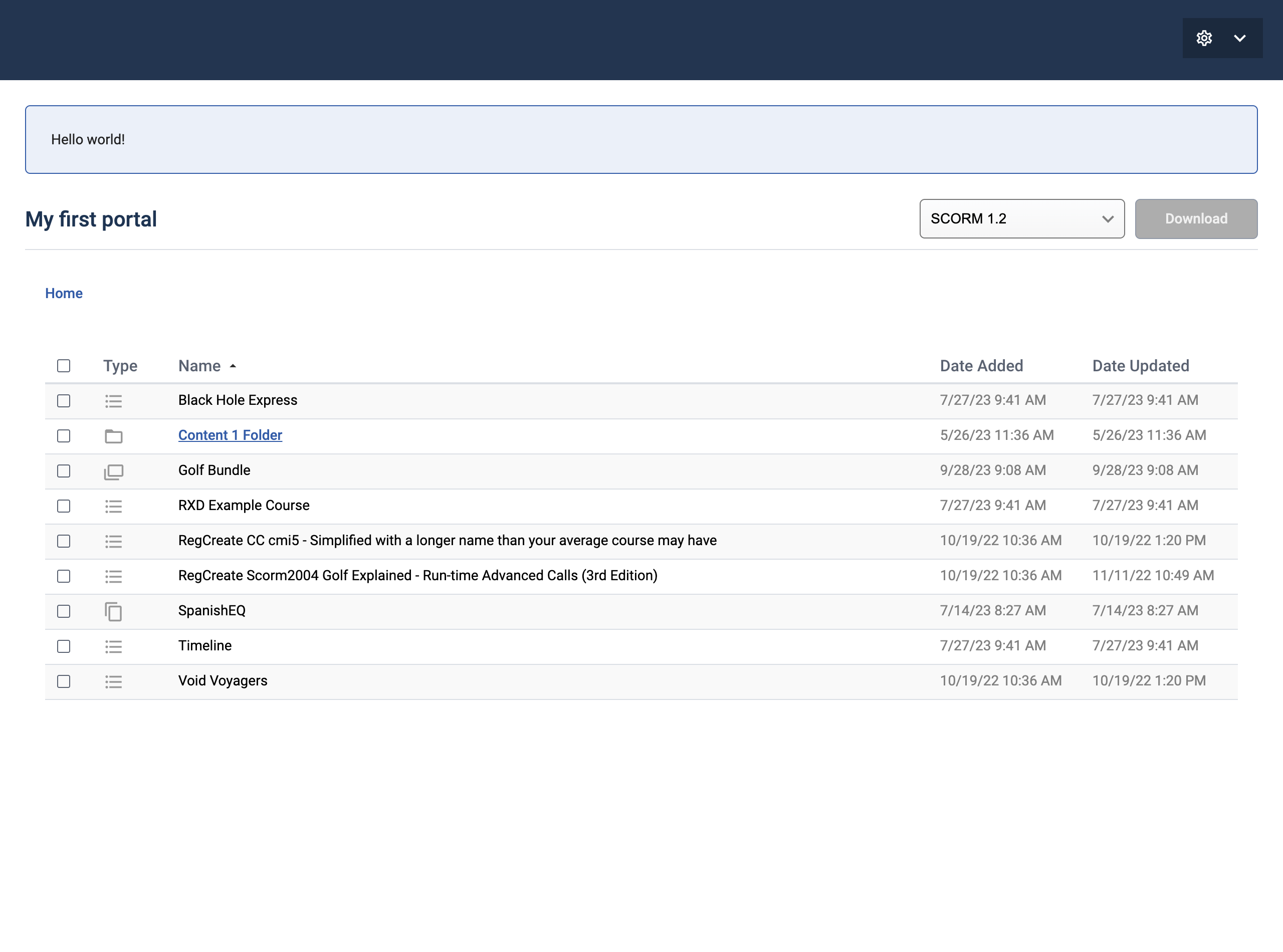
# Content Portal overview

## What is Content Portal?

Content Portal offers a secure way to share content with external users. You can create a dedicated portal webpage for each Account within Content Controller, allowing you to grant access to specific clients or stakeholders without giving them access to Content Controller itself.

### Highlights

<table data-header-hidden><thead><tr><th></th><th></th><th data-hidden></th></tr></thead><tbody><tr><td><strong>Standards</strong> <strong>control</strong> → Support for all all available Content Controller dispatch standards. With granular control over which are available to portal users.</td><td><strong>Portal per account</strong> → Each account may have one independent portal, which can be turned on or off as needed.</td><td></td></tr><tr><td><strong>Custom banner message</strong> → Post a custom message which is displayed at the top of the portal.</td><td><strong>Branding options</strong> → Create a consistent brand experience by customizing colors and uploading a logo for each portal.</td><td></td></tr><tr><td><strong>Access control</strong> → Securely manage access to each portal. Which is granted on a per-portal basis, ensuring that users only see the content they are authorized to view.</td><td><strong>Organization</strong> → Each portal will mirror an accounts layout. Displaying all shared content in the same structure including folders.</td><td></td></tr><tr><td><strong>License (optional)</strong> → Enhance transparency by choosing to display content and license information.</td><td><strong>Tags (optional)</strong> → Optionally display tags to improve content discoverability.</td><td></td></tr></tbody></table>

<figure><img src="https://2751937154-files.gitbook.io/~/files/v0/b/gitbook-x-prod.appspot.com/o/spaces%2F-Lu-ZWvY7BC8vS5I6doj%2Fuploads%2F1EwVALF2JMuY6lxsAela%2Fimage.png?alt=media&#x26;token=96913fd1-4a97-47b6-a42e-cff75c10fc96" alt=""><figcaption></figcaption></figure>


---

# Agent Instructions: Querying This Documentation

If you need additional information that is not directly available in this page, you can query the documentation dynamically by asking a question.

Perform an HTTP GET request on the current page URL with the `ask` query parameter:

```
GET https://guide.contentcontroller.com/content-portal/content-portal-overview.md?ask=<question>
```

The question should be specific, self-contained, and written in natural language.
The response will contain a direct answer to the question and relevant excerpts and sources from the documentation.

Use this mechanism when the answer is not explicitly present in the current page, you need clarification or additional context, or you want to retrieve related documentation sections.